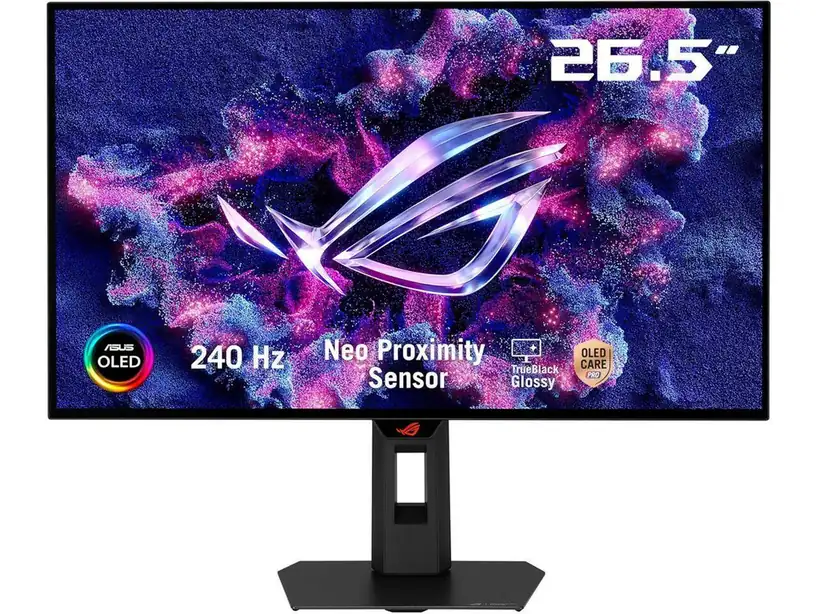
ASUS ROG XG27AQDMGR 27
By ASUS · Gaming Monitors · Audio & Electronics
- 27 in WOLED panel, 2560 x 1440 at 240 Hz
- 0.03 ms GTG response time
- 99% DCI-P3 coverage
- 1,500,000:1 contrast ratio
- 1300 nits peak brightness
Lowest price seen
~$399.00 (approx.)
from $399.00 at Amazon
- Amazon ~$399.00 (approx.)View at Amazon
- ASUSView at ASUS
- eBay (used) eBay: used, open-box, refurbishedView at eBay (used)
- eBayView at eBay
- NeweggView at Newegg
- TargetView at Target
Prices are snapshots. Check the current price with the store.
Summary
A 27-inch 1440p 240-Hz WOLED gaming monitor (model XG27AQDMGR, the Gen2 refresh of the 2024 XG27AQDMG) for PC and console gamers who want OLED contrast and fast motion. Check the WOLED text fringing and the $399 sale price (B&H, October 2026) before you buy.
Strengths
- True OLED contrast with no backlight blooming; TFTCentral found rich dark scenes and clean gloss with less haze than the older model.
- Very fast measured response: 0.167 ms total display lag at native refresh (TFTCentral).
- Tunable brightness: about 262 nits in stable SDR Uniform Brightness mode, up to 425 nits with it off.
- Strong HDR highlights: up to about 1,155 nits in small-window modes (TFTCentral), 1,130 nits with unlocked settings (Monitor Garage).
- HDMI 2.1 FRL carries 240-Hz native and tested 4K/120 console input, a real upgrade over the predecessor’s HDMI 2.0.
- Neo Proximity Sensor and OLED Care Pro (pixel cleaning, screen move, logo dimming) help limit static-image wear.
Weaknesses
- The older RWBG-like WOLED subpixel layout puts colored fringing on thin text at 27-inch QHD density; TFTCentral and Monitor Garage both report it.
- Dark-gray vertical banding shows up on near-black content, and sample variation is real: one test sample kept a residual grid-like effect after pixel cleaning.
- VRR flicker and near-black gamma shift appear as frame rates drop; Anti-Flicker modes trade away part of VRR to reduce them.
- Burn-in stays a cumulative risk with static taskbars and game HUDs despite the three-year burn-in coverage.
- No USB-C video or charging, no KVM, no PiP/PbP, no speakers; ELMB works only at 120 Hz in SDR with VRR off.
- The glossy panel throws back reflections from windows or lights that face the screen.
Verified specifications
| Panel | 26.5-inch (marketed as 27-inch) flat 16:9 LG Display WOLED, MLA-era layout; 2560 × 1440 at up to 240 Hz. |
|---|---|
| Response and pitch | 0.03-ms GtG maker specification; 0.229-mm pixel pitch; native 10-bit (1.07 billion colors). |
| Color and contrast | 99% DCI-P3, Delta-E below 2 factory accuracy, 1,500,000:1 typical contrast. |
| HDR | 1,300-nit peak in limited HDR conditions, not full-screen sustained luminance. |
| Screen coating | TrueBlack Glossy with a 0% haze layer (TFTCentral), versus 3% haze on the predecessor. |
| Inputs | 1 × DisplayPort 1.4 with DSC, 2 × HDMI 2.1 (FRL), 2 × USB 3.2 Gen1 Type-A with USB Type-B upstream, 3.5-mm headphone output; no USB-C, KVM, PiP/PbP or speakers. |
| Console | accepts up to 4K 120-Hz input downscaled to 1440p, with Xbox HDR10, VRR and ALLM; no Dolby Vision. |
| Adaptive refresh | FreeSync Premium Pro, NVIDIA G-SYNC Compatible, VESA AdaptiveSync 240-Hz; 48–240 Hz true VRR with LFC below (TFTCentral). |
| ELMB/BFI | only at 120 Hz in SDR with VRR disabled. |
| Ergonomics | height/tilt/swivel/pivot stand, tilt about -5° to +20°, 100 × 100 mm VESA, Kensington slot. |
| Power | less than 26.8 W typical, below 0.5 W sleep, 0.3 W power-off; internal PSU, AC 100–240 V/50–60 Hz. |
| Dimensions | 23.82 W × 19.69 H × 7.40 D in with stand; 23.82 W × 14.49 H × 2.48 D in without; about 14.55 lb with stand, 10.58 lb without. |
| In the box | DisplayPort cable, USB Type-B to Type-A upstream cable, AC power cord, microfiber cloth, stand, VESA mount kit, quick-start document, ROG pouch/sticker, warranty card; no firmly promised HDMI cable. |
| Warranty | three years including OLED panel burn-in (ASUS US). |
Full research notes and sources
Text quality and the subpixel layout
This generation keeps the older MLA-era WOLED subpixel arrangement despite ASUS’s “Clear Pixel Edge” marketing. TFTCentral and Monitor Garage both report colored outlines and compromised thin-text quality at 27-inch QHD density, and Monitor Garage found that its text enhancement mode could worsen sharpness. This is a structural rendering characteristic, not a faulty panel. A newer-layout or 4K display is usually better for all-day tiny text. Owners in a December 2025 r/OLED_Gaming thread disagreed on how objectionable the colored edges look, so tolerance is personal.
HDR, brightness and dark-gray uniformity
The 1,300-nit peak applies to limited HDR conditions, not full-screen sustained luminance. TFTCentral measured up to about 1,155 nits in small-window brighter HDR modes; its default True Black 400 mode tracked tone more accurately but peaked around 423 nits. Monitor Garage measured about 1,130 nits with selected unlocked settings, with gamma and color accuracy compromises. Without Uniform Brightness, scrolling from dark to bright webpages changes overall brightness through ABL; TFTCentral’s stable office-oriented mode sits at roughly 262 nits.
Dark-gray uniformity is the other caveat. TFTCentral’s sample showed modest banding at 240 Hz under extreme near-black full-field tests, reduced at lower refresh. Monitor Garage saw substantial fresh-out-of-box banding on its different sample, which improved after pixel cleaning but kept a residual grid-like effect. Sample variation is real: one clean test sample cannot cancel out the other’s issue. Nobody has published a population defect rate, so inspect dark-gray scenes on receipt and use return rights if conspicuous bands persist.
Gaming, VRR and motion
TFTCentral measured 0.167 ms of total display lag at native refresh and estimated 0.04 ms of processing lag under its methodology, with excellent motion clarity and quick OLED transitions. These are laboratory measurements in one setup, not zero end-to-end latency. The monitor supports 48–240 Hz true VRR with lower-framerate compensation below.
The catch is VRR flicker: the darkest shades brighten as FPS drops, with potential flicker under variable dark-scene frame rates. Anti-Flicker Middle and High modes reduce some variability but sacrifice part of true VRR behavior, creating dead zones that can introduce tearing. Keeping frame delivery stable is the practical mitigation. ELMB blur reduction is not a free 240-Hz bonus: it requires 120 Hz, SDR and VRR disabled, adds about 7 ms of lag, and caps at 172 nits. At native 240 Hz with sufficient frame rates, normal operation may be preferable.
Burn-in, care and running costs
Burn-in is a cumulative risk, not a zero-risk feature. Fixed taskbars, dashboards, browser chrome and static game HUDs can create unequal OLED wear over time, despite the three-year limited burn-in coverage. The Neo Proximity Sensor blacks out the image when you step away, and OLED Care Pro adds pixel cleaning, screen move and static-logo dimming. These reduce exposure but cannot eliminate irreversible age-related wear. One March 2026 exact-model Reddit owner asked about burn-in, and other users advised sleep and refresh cycles; that is experience, not a lifespan guarantee.
Routine care means letting the screen enter standby and complete pixel-cleaning cycles, and not unplugging the AC cord while a cycle runs. ASUS’s support FAQ describes about 6-minute cleaning cycles and roughly four-hour usage reminders as general OLED guidance. For cleaning, the manual says to switch off and disconnect power, use a lint-free nonabrasive cloth, and use a lightly moistened cloth with compatible mild cleaner for stubborn marks; avoid alcohol and acetone and never spray the display directly.
Running costs are low. There are no mandatory subscriptions. Using the manufacturer’s 26.8 W typical figure for 8 hours a day plus 0.5 W sleep for 16 hours gives 81.176 kWh a year, about $16.24 at an assumed $0.20/kWh. There are no routine user-replaceable consumables. If you need a generic replacement, a 6-ft DisplayPort 1.4 cable is $8.29, a USB 3.0 A-to-B cable $6.79 and an IEC C13 power cord $4.19 (Monoprice, 2026). Genuine ASUS replacement parts for the panel, boards or PSU are not sold direct to consumers, and internal power electronics should be serviced by qualified technicians.
Is it worth it?
At $350 or below new this is excellent; $350–$425 is a strong buy if the glossy surface and Neo sensor are wanted; $425–$475 is acceptable with a preferred seller and warranty. Above $475, compare the LG UltraGear 27GX700A-B 280-Hz Tandem OLED at $499.99 (Best Buy, October 2026) or the MSI MAG 272QP QD-OLED X24 at $399.99 (B&H). Buyers doing mostly static office work should also price a 27-inch QHD or 4K IPS.
B&H Photo lists the exact XG27AQDMGR at $399.00 (October 2026), marked down from a $599.00 reference, and ASUS’s own US store page showed the same $399.00 promotional figure. Newegg marketplace listings begin around $613.32 new, and a Best Buy storefront offer was $614.99. TFTCentral documented $549 pricing in April 2026. These are asking prices from October 2026, not a permanent MSRP.
Sources
Manufacturer:
- ASUS ROG Strix OLED XG27AQDMG Gen2 user manual (ManualsLib)
- ASUS ROG USA — ROG Strix OLED XG27AQDMG Gen2 (XG27AQDMGR) product page
- ASUS ROG USA — XG27AQDMGR technical specifications
- ASUS ROG — XG27AQDMGR support and user-manual downloads
- ASUS ROG USA — XG27AQDMGR warranty and support
- ASUS Support — OLED panel protection and pixel-cleaning guidance
Independent reviews:
- TFTCentral — ASUS ROG Strix XG27AQDMG Gen2 review
- Monitor Garage — ASUS ROG XG27AQDMGR review
- RTINGS — ASUS ROG Strix OLED XG27AQDMG (2024 predecessor)
- RTINGS — LG UltraGear 27GX700A-B review
Owner reports:
- Owner discussion of XG27AQDMGR text clarity and reflections (r/OLED_Gaming)
- Dead/stuck pixel on a newly delivered XG27AQDMGR (r/pcmasterrace)
- Faint electrical noise when off (r/ASUSROG)
- OLED care for the XG27AQDMGR (r/OLED_Gaming)
- XG27AQDMGR owner Q&A with moderator care advice (ASUS ROG forum)
Parts and stores: