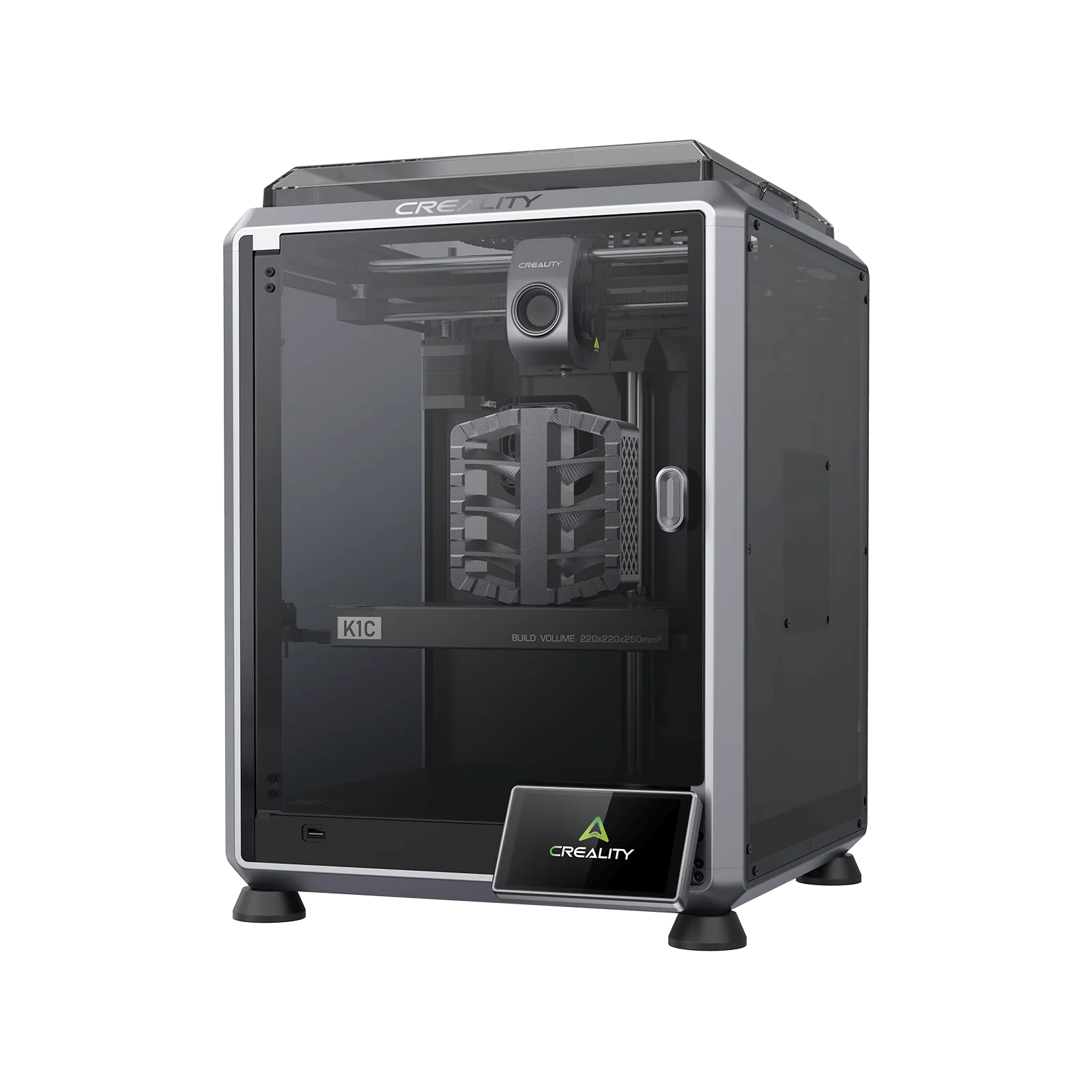
Creality K1C Enclosed CoreXY 3D Printer with AI Camera
By Creality · Enclosed 3D Printers · 3D Printing
- Build volume 220 x 220 x 250 mm
- Max speed 600 mm/s, typical 300 mm/s
- Nozzle up to 300 °C
- Bed up to 100 °C
- Weight 12.5 kg
Lowest price seen
$369.00
from $369.00 at MatterHackers · Checked Oct 10, 2026
- MatterHackers $369.00View at MatterHackers
- CrealityView at Creality
- eBay (used) eBay: used, open-box, refurbishedView at eBay (used)
- eBayView at eBay
- WalmartView at Walmart
- NeweggView at Newegg
- AmazonView at Amazon
Prices are snapshots. Check the current price with the store.
Summary
An enclosed CoreXY FDM printer with a 300 °C hotend, Klipper-derived open firmware, a standard AI camera and carbon-fibre filament capability. Check the firmware version before you buy: v1.3.5.22 broke LAN camera streaming for multiple owners.
Strengths
- Enclosure and carbon filter make ABS and ASA usable in a living space.
- Klipper-derived firmware is open-source and rootable to vanilla Klipper; no cloud account required.
- Auto leveling wipes the nozzle before probing, and input shaping is tested automatically.
- The tri-metal Unicorn nozzle prevents the hotend leaks that plagued earlier K1-series machines.
- Ships 98% assembled; owners report setup in about 10 minutes.
- AI camera with spaghetti and foreign-object detection is standard, not optional.
Weaknesses
- The rear spool holder and reverse-Bowden tube create an awkward filament path; Tom’s Hardware calls it “terrible”.
- The smooth PEI build plate requires glue stick for reliable first-layer adhesion.
- Firmware v1.3.5.22 (July 2026) broke LAN camera streaming for multiple K1-series owners; downgrade was the working fix.
- Layer shifting as speed ramps appears in owner threads and tops Creality’s own ten-problem troubleshooting list.
- The integrated nozzle/heat-break design makes replacement nozzles more expensive than K1 nozzles.
- WiFi is 2.4 GHz only, which is why the printer sometimes does not appear in the Cloud app.
Verified specifications
| Build volume | 220 x 220 x 250 mm. |
|---|---|
| Motion system | CoreXY with automatic leveling and input shaping. |
| Max nozzle temperature | 300 °C; max heated bed temperature: 100 °C. |
| Max printing speed | 600 mm/s; typical printing speed 300 mm/s (both Creality Lab data). |
| Max acceleration | 20 000 mm/s² (Creality Lab data). |
| Layer height | 0.1-0.35 mm. |
| Extruder | dual-gear direct drive (manual calls it “Sprite Direct Drive”). |
| Nozzle | 0.4 mm tri-metal “Unicorn” (copper body, titanium-alloy heat break, hardened-steel tip). |
| Build plate | PEI flexible plate on magnetic steel. |
| Display | 4.3-inch color touch screen. |
| File transfer | USB flash drive, WiFi/LAN, Creality Cloud; Cura 5.0+ compatible. |
| Filament diameter | 1.75 mm. |
| AI camera | standard, with spaghetti detection, foreign-object detection, time-lapse and remote monitoring; active alerts require Creality Print or Creality Cloud app. |
| Air purifier | activated-carbon cabin filter. |
| Power-loss recovery | yes. |
| Filament runout sensor | yes. |
| Noise | silent mode ≤45 dB at 1 m (manufacturer figure). |
| Supported filaments | ABS, PLA, PETG, PET, TPU, PA, ASA, PC, PLA-CF, PA-CF, PET-CF. |
| Dimensions | 355 x 355 x 482 mm (14 x 14 x 19 in); 12.4 kg net, 16 kg gross. |
| Rated power | 350 W. |
| WiFi | 2.4 GHz only. |
Full research notes and sources
Speed and firmware
Creality labels 600 mm/s as the maximum and 300 mm/s as the typical printing speed, both marked “Data from Creality Lab” — treat the headline figure as a peak, not a sustained print speed. The 20 000 mm/s² acceleration rating is also first-party data. No independent benchmark suite exists for the K1C; Tom’s Hardware’s timed prints (1 h 12 min for a TPU part at 0.2 mm, 2 h 47 min for a full ABS plate at 0.2 mm) are the only wall-clock data points from an established review.
The firmware is the printer’s biggest software asset and its biggest recent liability. Klipper-derived, open-source and rootable to vanilla Klipper, it supports LAN and plain USB printing with no cloud account. But firmware v1.3.5.22, posted 2026-07-12 with update notes reading only “optimize video stream transmission security” and “optimize model fan control logic”, broke LAN camera streaming for a string of K1 and K1C owners. The mobile apps still worked; the LAN stream did not. A user reverse-engineered the change and found the stream had moved to WebRTC, then published a script that pulls it over LAN with no cloud connection. Another documented the failing cam_app service and restored the camera by restarting mjpg_streamer. Downgrade was the working fix.
Filament path, hotend and build plate
Tom’s Hardware lists “terrible filament path” as a reason to avoid the K1C: a rear-mounted spool holder feeding a reverse-Bowden tube across the top of the machine. TPU has to be hand-fed the last few centimeters into the extruder. Creality answered with printable side spool-holder mounts on the included USB stick; the higher mount strains the runout sensor, the lower one works better.
The smooth PEI sheet is the second named weakness. Owners on r/CrealityK1C report first-layer adhesion problems despite a good bed mesh, solved by glue stick and then by an aftermarket plate. Creality’s own accessory line now includes a coarsely textured PEI plate marketed for better adhesion with PLA-CF and other engineering filaments.
A long-time poster on Creality’s forum explains that the first two generations of K1-series hotends had a nozzle/heat-break interface that expanded slowly in use and leaked, and that Creality’s fix was the tri-metal Unicorn nozzle and the ceramic heating-block upgrade kit. On a K1C with the Unicorn nozzle that class of leak is designed out. Other owner complaints cluster on layer shift as speed ramps (also the first item on Creality’s own ten-problem list, with belt tension, gantry squareness and excessive speed as causes), boot freezes at the logo screen, and extruder jams from spool tangles or wet filament. A forum DOA case was fixed only after someone told the owner to check the voltage selector switch on the side of the machine set for US mains. One commenter in the r/Creality K1C thread says flatly: “Do not buy the K1C if you plan to print CF filament” — a single comment with no elaboration, contradicted by the printer’s design intent.
Parts, running costs and repairability
Creality sells the exact-model quick-swap nozzle kit for $36.85 (list $40.94), a K1C PEI build plate without the soft magnetic sticker for $20.98 (list $23.31), and a 2 m Teflon tube kit for $8.33 (Creality US store, 2026-10). The integrated nozzle/heat-break design makes replacement nozzles meaningfully more expensive than K1 nozzles. The activated-carbon cabin filter is a consumable that ships in the box. A filament dryer is a real extra cost if printing nylon or other hygroscopic materials — the optional Creality Space Pi dryer is $85 and “worked well” in Tom’s Hardware’s test.
There is no subscription or filament lock-in: files can be sliced in Cura 5.0+ and sent by USB stick or LAN with no cloud account. Repairability is reasonable for the class; Creality publishes K1-series Klipper sources on GitHub and forum posters swap hotends, adapter boards and mainboards themselves. What Creality does not publish is a readable warranty policy: the warranty page is a serial-number lookup tool, so the “Up to 12-Month Warranty” banner on the store page is unverified against terms.
Is it worth it?
Under roughly $400 it is a straightforward recommendation for anyone who wants an enclosed, camera-monitored, carbon-fibre-capable CoreXY without spending flagship money. The stock plate and filament path are worth fixing with glue stick, a third-party plate and a printed side spool holder. Near $500 it is defensible but no longer obvious, because Creality’s own K1 is $299.00 on the same store. Creality’s US store lists the K1C at $499.00 against a $559.00 compare-at (2026-10). Adding multicolor costs another $319.00 for the CFS, putting a full K1C multicolor stack at about $818. Above $559 there is no good reason to buy it.
Which model this is
This page covers the Creality K1C, the K1’s enclosed CoreXY successor with a new hotend, an all-metal extruder, a standard AI camera, a cabin filter and an improved leveling system. The Amazon listing is ASIN B0CQKTYWXS. Do not confuse it with the K1, K1 Max, K1 SE or K2 lines; the K1C does not have Lidar, which remains a K1 Max feature.
Sources
Manufacturer:
- K1C Carbon Fiber 3D Printer | Creality Official
- Creality K1C Quick Installation Guide / manual — Creality Download Center
- How To Fix 10 Common K1C 3d Printer Problems? — Creality Blog
- Warranty & Device Rights Check — Creality Official
- K1C Carbon Fiber 3D Printer — Creality Store (US)
- Creality K1 Speedy 3D Printer — Creality Store (US)
- CFS - Creality Filament System (16-color) — Creality Store (US)
Independent reviews:
- Creality K1C Review: C for Carbon | Tom’s Hardware
- Filament Feeding Issue/Clogging Issue — Creality Wiki (K1C troubleshooting)
- Creality K1 vs K1C — Creality Experts
Owner reports:
- K1C DOA — Creality Community Forum
- Creality k1 join from heat sink to hotend leaking — Creality Community Forum
- New K1C firmware v1.3.5.22 (Mono-color) — Creality Community Forum
- K1C Problem Advice Sought — Creality Community Forum
- Latest Creality Flagship K1 & K1C topics — Creality Community Forum
- Creality K1C: Thoughts and opinions — r/Creality
- K1C Nozzle Connection Abnormal error — r/Creality
- CrealityK1C subreddit — r/CrealityK1C
- KEY 2515 — r/crealityk1
- K1C decrease extruder tension — Creality Community Forum