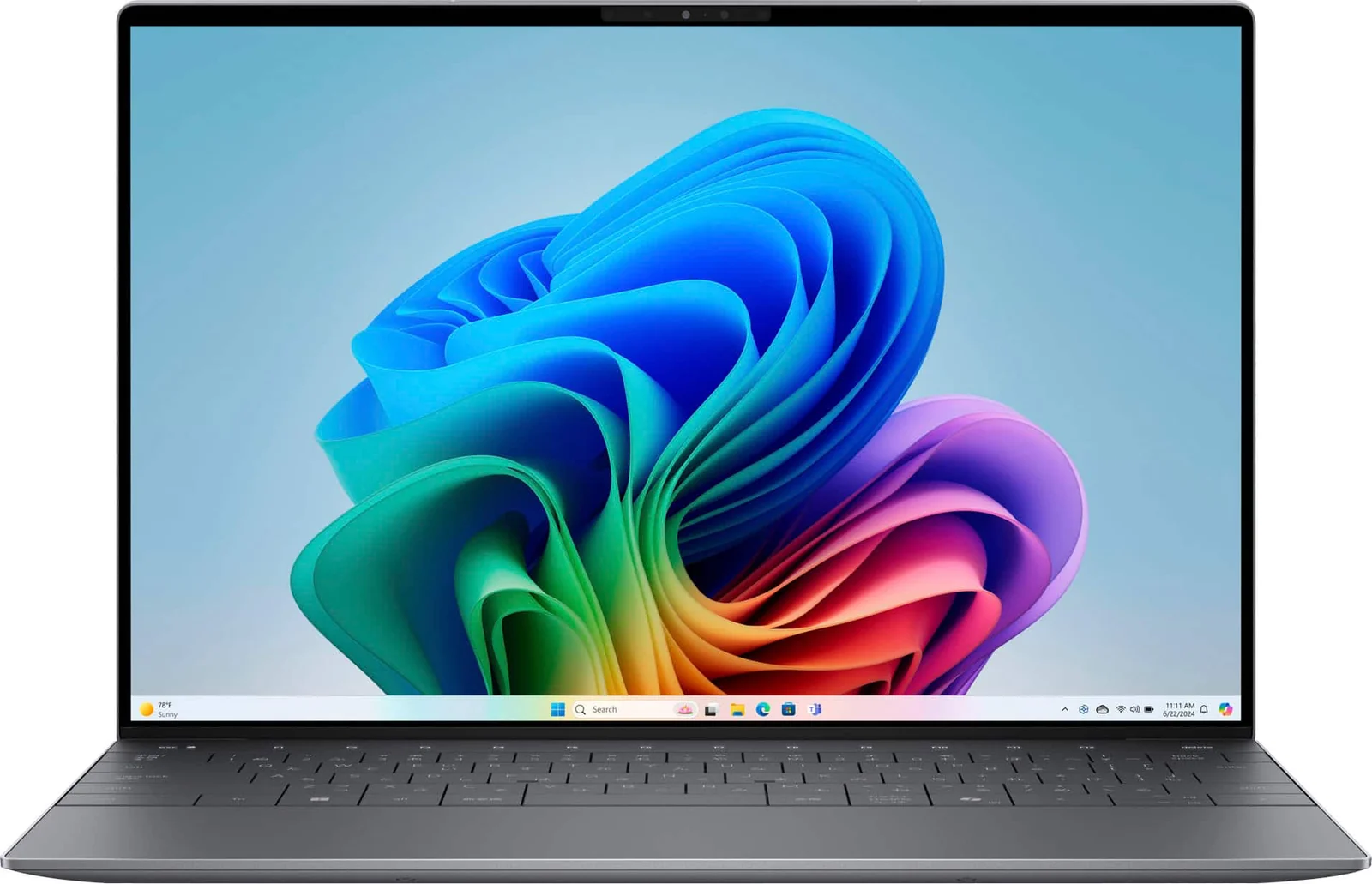
Dell XPS 13 (2026) 13.4-inch 2.5K Touchscreen
By Dell · Laptops · Phones & Computers
- 13.4-inch 2.5K touchscreen, 120Hz
- Intel Core 5 320 (Panther Lake), 8GB LPDDR5x, 1TB SSD
- 2.2 lb aluminum build
- Up to 20 hours battery (LED config)
Lowest price seen
~$1,000.00 (approx.)
from $1,000.00 at Amazon
- Amazon ~$1,000.00 (approx.)View at Amazon
- DellView at Dell
- Best BuyView at Best Buy
- eBay (used) eBay: used, open-box, refurbishedView at eBay (used)
- eBayView at eBay
- TargetView at Target
- NeweggView at Newegg
Prices are snapshots. Check the current price with the store.
Summary
The 2026 Dell XPS 13 DX13260 is a 13.4-inch 2.5K touch Windows laptop built for portable office work, streaming and light programming. Check the configuration before you buy: this Core 5 model solders 8GB of RAM with no upgrade path, and its two USB-C ports are USB 3.2 Gen 2 rather than Thunderbolt 4.
Strengths
- Notebookcheck measured a 503-nit average display with nearly full Display P3 coverage and good contrast for IPS.
- At 2.2lb and 12.7mm thin, the aluminum chassis is light and well-finished for the price.
- Tom’s Guide measured 14h26m of Wi-Fi browsing and Notebookcheck 18h26m of web surfing on 8GB/512GB samples.
- Fans stay quiet for light web and video work, becoming noticeable mainly under CPU-intensive loads.
- Tom’s Guide handled about 15 browser tabs and background YouTube and measured Geekbench 6 single 2684 / multi 7952.
- The SSD and battery are removable using Dell’s published service instructions, unlike the soldered RAM and Wi-Fi radio.
Weaknesses
- The 8GB soldered, single-channel RAM cannot be upgraded, and Notebookcheck says the CPU/RAM pairing struggles outside browsers, spreadsheets and word processing.
- The two-Xe3 integrated GPU is a performance limit, not a defect: Tom’s Guide measured about 8.7fps in a Borderlands 3 1080p run.
- Despite the 120Hz panel, Notebookcheck measured 33.6ms pixel response and flagged the screen as poor for fast gaming.
- Notebookcheck names chassis rigidity as a compromise relative to more expensive XPS generations.
- The 1080p webcam produced blurry, pale images in Tom’s Guide’s testing.
- Only two identical USB-C ports, no headphone jack, and a Wi-Fi radio that requires motherboard service if it fails.
Verified specifications
| Model | Dell XPS 13 DX13260, launched mid-2026 in Sky and Storm colors, with Windows 11 Home on the consumer configuration. |
|---|---|
| Processor | Intel Series 3 Core 5 320 (Wildcat Lake), 6 cores / 6 threads (two P-cores, four LP E-cores), up to 4.6GHz, 6MB cache. |
| Graphics | integrated Intel GPU with two Xe3 cores; this is Core 5, not Core Ultra 5 or Core Ultra 7 355. |
| Memory | 8GB LPDDR5x-7467, soldered and single-channel, with no RAM slot or post-sale upgrade. |
| Storage | M.2 PCIe Gen4 options of 256GB TLC, 512GB QLC and 1TB QLC; the tested 8GB unit used a 512GB Kioxia BG7. |
| Display | 13.4-inch 2560×1600 16:10 IPS touchscreen, 30–120Hz variable refresh, 500-nit manufacturer rating; Notebookcheck measured 502.8 nits average, 99.9% sRGB, 98.2% Display P3 and about 2157:1 contrast. |
| Response time | 33.6ms black-to-white measured by Notebookcheck, with no PWM flicker detected. |
| Ports | two USB-C USB 3.2 Gen 2 (10Gbps) with DisplayPort 2.1 and Power Delivery; no USB-A, HDMI, SD-card reader or 3.5mm headphone jack. |
| Wireless | Intel Wi-Fi 7 BE213 2×2 and Bluetooth 6.0, with the radio integrated on the system board and not separately replaceable. |
| Battery and charger | 3-cell 52Wh internal battery and a 65W USB-C power adapter; either USB-C port can charge it. |
| Dimensions | 11.69 × 7.9 × 0.5 in (296.9 × 200.66 × 12.7 mm); starting weight 1.0kg / 2.2lb, CNC aluminum body. |
| Camera and speakers | 2MP 1080p IR camera, dual microphones with Windows Hello, quad speakers rated 8W peak. |
| Warranty | Dell Basic Hardware Service with Mail-In on standard consumer configurations, typically 12 months; verify the invoice and service tag. |
Full research notes and sources
Memory and performance
The headline problem is memory. Dell sells the Core 5 320 with 8GB of LPDDR5x-7467 soldered to the board and no DIMM slot, so a 1TB SSD adds storage but does nothing for RAM pressure from tabs, productivity apps, development tools or virtual machines. Notebookcheck recommends 16GB where the budget allows; Tom’s Guide found light workflows fine, which shows 8GB is not immediately unusable but runs out sooner with parallel heavyweight apps. A 16GB Core 5 build is single-channel too, so do not treat it as equivalent to a dual-channel Core Ultra machine just because the capacity matches.
Performance is fine for browsing, office work and streaming, and weak for gaming, local AI or heavy creative work. Tom’s Guide measured Geekbench 6 single 2684 / multi 7952 on its 8GB/512GB unit and about 8.7fps in Borderlands 3 at 1080p; Notebookcheck assigns low games-performance marks to the two-Xe3 graphics.
Display, battery and power
Notebookcheck measured a 502.8-nit average, 99.9% sRGB, 98.2% Display P3 and about 2157:1 contrast on its 8GB/512GB review device, while Tom’s Guide measured 398 nits SDR under a different procedure, a good reminder that production panels vary. The 120Hz refresh does not buy fast pixel transitions: Notebookcheck measured 33.6ms black-to-white and found no PWM flicker. This is a good IPS panel, not an OLED.
Battery figures come from two 8GB/512GB samples, not a retail 8GB/1TB unit. Tom’s Guide measured 14h26m of continuous Wi-Fi browsing at 150 nits and Notebookcheck 18h26m of Wi-Fi web surfing under its own method. Power draw on a tested 8GB/512GB sample was 1.9W minimum idle, 5.4W average idle, 20.6W average load and 52W maximum wall-side draw, all scenario-specific rather than an annual-use prediction.
Ports, wireless and serviceability
The Core 5 320 gets two USB-C USB 3.2 Gen 2 (10Gbps) ports with DisplayPort 2.1 and Power Delivery; Thunderbolt 4 belongs to Core Ultra-equipped DX13260 builds, as Dell’s own setup and specifications manual states. There is no USB-A, HDMI, SD-card reader or 3.5mm headphone jack, so a dock is needed for wired Ethernet, HDMI, USB-A peripherals or analog headphones. Charging occupies one of the two ports.
Dell’s DX13260 service manual documents battery removal with six M2×4 screws, an SSD held in a thermal sleeve by one M2×2.5 screw, and display replacement as a whole assembly. The Wi-Fi module is soldered to the motherboard, so a failed radio can require board service. Repair routes exist, but check parts availability and labor costs before relying on them.
Parts and running costs
There is no recurring filter, cartridge or user-scheduled consumable. The real future costs are battery aging, a damaged charger or port, storage expansion and accidental screen damage. Dell does not publish a fixed US battery or 1TB SSD replacement price for this model in the sources checked, so get a service-tag-matched part from Dell’s parts selector rather than budgeting a fixed annual figure.
Electricity is the only predictable running cost. Notebookcheck measured 1.9W idle, 5.4W average idle, 20.6W average load and 52W maximum wall draw on an 8GB/512GB sample. Running 2,000 eight-hour office hours a year at an assumed 10W average costs about 20 kWh, or $4 at $0.20/kWh; at the measured 20.6W load held continuously the same year is about 41.2 kWh, or $8.24. Both examples exclude standby, external screens, hub power and the actual tariff.
Price thresholds
Dell’s US store listed an 8GB/256GB custom build at $699.99 in October 2026, an 8GB/512GB fixed build at $799.99 and a 16GB/512GB fixed build at $999.99. TechRadar reported a $799.99 16GB/512GB promotion at Best Buy on October 5, 2026. A 1TB storage upgrade was quoted at either $200 or $300 depending on the configurator base, so an 8GB/1TB order lands near $1,000. Dell also advertises education pricing from $599, Apple launched the MacBook Neo at $599 (Apple, March 2026), and Dell lists an Inspiron 14 2-in-1 at $879.99.
Is it worth it?
For an 8GB/1TB build, $700–$750 is a compelling deal and $751–$850 is reasonable only if 1TB matters and memory needs are modest. At $851–$950 it is weak against waiting for a 16GB/512GB sale, and at $951–$1,050 it is poor value for soldered 8GB when Dell itself lists 16GB/512GB at $999.99. Securing 16GB now is worth more than extra internal storage, because the RAM cannot be changed later.
Which model this is
This page covers the 2026 XPS 13 DX13260 Core 5 320 with Wildcat Lake and 8GB soldered memory. Dell’s order codes include dx13260_reg_03 for a configurable unit and dx13260_fixed_61 for an 8GB/512GB preconfigured offer. It is not the XPS 13 9315, 9340, 9345 Snapdragon, 9350 Lunar Lake, or the Core Ultra 7 355 Panther Lake DX13260 build, which can differ in chipset, graphics, bandwidth and I/O.
Sources
Manufacturer:
- Dell USA — 2026 XPS 13 DX13260 fixed configurations and specs
- Dell USA — XPS 13 DX13260 configurable Core 5 320 storage and price options
- Dell USA — XPS 13 DX13260 fixed 8GB/512GB order and service-plan details
- Dell USA — fixed DX13260 16GB/512GB option
- Dell DX13260 service manual — installing the M.2 SSD and thermal sleeve
- Dell DX13260 setup and specifications — external ports and slots
- Dell DX13260 service manual — wireless module bracket
- Dell DX13260 service manual — installing the battery
- Dell DX13260 — service, setup and reimaging documentation
- Dell DX13260 service manual — removing the display assembly
- Dell DX13260 service manual — removing the I/O daughterboard
- Dell XPS laptops battery and power-adapter parts selector
- Dell USA — direct store return policy
Independent reviews:
- Notebookcheck — XPS 13 Wildcat Lake 8GB/512GB review
- Tom’s Guide — Dell XPS 13 (2026) review
- The Verge — Dell XPS 13 2026 review
- Tom’s Hardware — Dell’s $699 XPS 13 launch and Wildcat Lake specs
- Tom’s Hardware — XPS 13 introductory prices and Wildcat vs Panther Lake specs
- Notebookcheck — first XPS 13 Wildcat and Panther configurations
- TechRadar — 16GB/512GB XPS 13 DX13260 reported Best Buy sale
Owner reports:
- New XPS 13 configuration discussion (r/DellXPS)
- Notebookcheck DX13260 test discussion and 8GB RAM opinions (r/hardware)
- 2026 XPS 13 DX13260 owner expectations (r/DellXPS)
Parts and stores: